
What privileged access management is for
Every company has a small set of accounts that can change anything: the domain administrator, root on a Linux server, the login on the firewall, the account that owns the database. They are usually shared, they are rarely changed, and they are the first thing an attacker looks for.
Privileged access management puts a layer in front of them. People are given access to a system, not a password. The platform holds the password, opens the session, and keeps a record of what happened in it.
| Why companies put one in | |
|---|---|
| Nobody knows who did what | Six people share the administrator password. The server log shows that the account connected. It does not show which of the six was at the keyboard. |
| Passwords spread and stay | The same password ends up in scripts, config files, password managers and people’s memory. It leaves the company with everyone who knew it. |
| One account is enough | An attacker who gets a single administrator password can use it on every server that accepts it, and in most networks nothing asks a second question. |
| Audits need evidence | “Who reached this server last quarter, and what did they run?” has to be answered with names, times and commands, not with a list of accounts. |
Nobody holds the password. Everyone has a name. Every session leaves a record.
How it works
-
User Access
The user initiates access through a single, centralised entry point on the PAM platform.
-
Authentication
The authentication process is secured with MFA; MFA is also automatically enforced during privilege escalation attempts.
-
Authorisation Control
Access requests are evaluated through defined policies and role-based authorisation (RBAC), with approval workflows triggered when required.
-
Secure Access
The user connects to the target system through an isolated, agentless architecture — via native RDP/SSH or a secure browser — without ever seeing the credentials.
-
Session Security
All session activity is monitored in real time and recorded; suspicious behaviour triggers automatic session termination, or an authorised user can join the session live when needed.
The same server, three ways in. One set of controls
A Windows or Linux server can be reached by any of the three, and the controls don’t change between them:
| In Mirket’s isolated browser | RDP and SSH over HTML5, with nothing installed on the machine at all |
| From a launcher the portal generates | Also nothing installed. Mirket produces a file the administrator runs: Microsoft Remote Desktop for RDP on Windows and macOS, and the SSH client already on their machine for SSH |
| In the Mirket agent | The agent carries its own RDP and SSH tooling, and holds the session within its own window instead of handing it to the desktop |
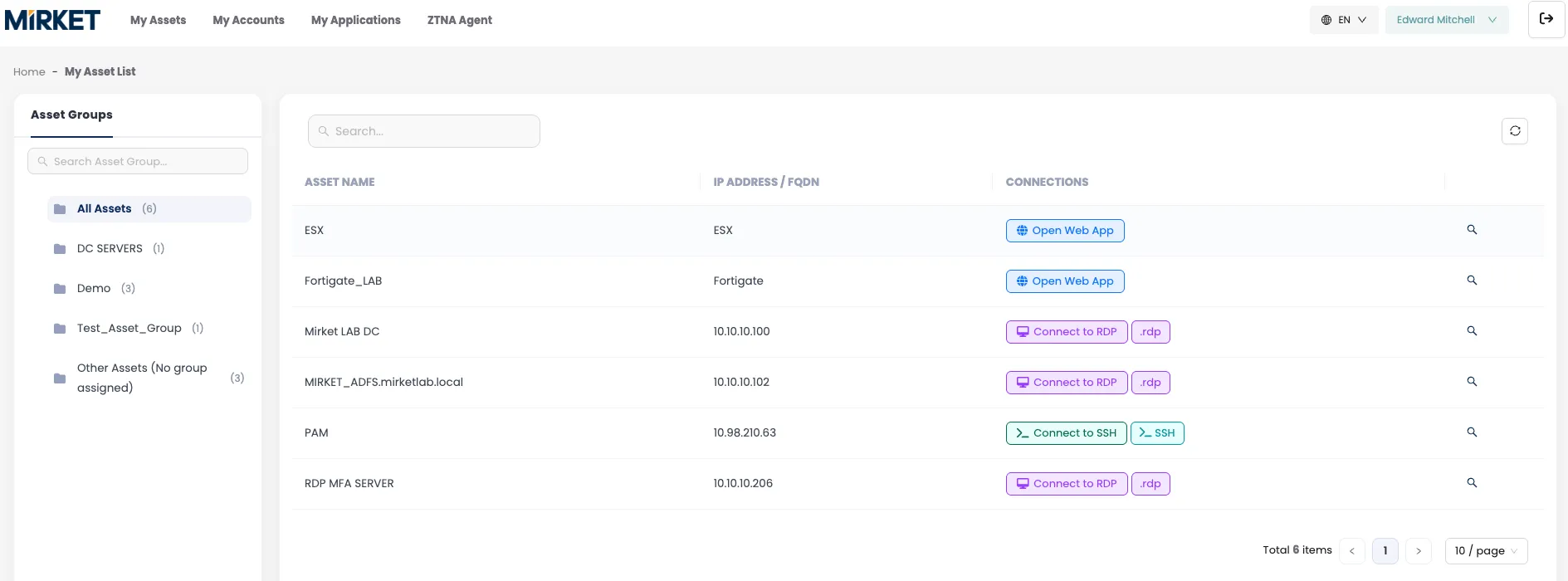
The launcher is worth a sentence of its own, because a generated connection file is usually the weak point in this kind of design. It has to be run within a minute of being produced, and it works exactly once. A file left in a downloads folder is not a way back in.
And web consoles open the same way — a firewall interface, a hypervisor, a backup console or an application published through a terminal server runs inside that same isolated browser.
Whichever path is taken, the five steps below are identical, and so is what gets recorded.
- Discovery builds the inventory. Point Mirket at the domain and it imports the servers that answer — hostname, IP, operating system, OU, reachability — along with the local accounts on them. You start from what’s actually there rather than from a spreadsheet somebody maintained until they left.
- Account mapping decides which account gets used. Per asset, or per asset group: this user, on this system, connects as this account. The user chooses a target, not a password.
- Session policy decides whether the session opens at all. It matches on users or groups, on targets or target groups, and on schedule. Its action is accept, deny, or send the request to an approver.
- The session opens by whichever of the three paths suits the work. The credential is injected into the session; it is never displayed and never typed.
- The session is recorded and transcribed, as video and as text, on both paths.
Steps 2, 3 and 5 don’t depend on step 4. The path is a convenience. It isn’t what decides the control — which is the whole reason administrators stop looking for a way around it.
Inside the session
Nothing inside a privileged session looks like an attack
An attacker who gets into a privileged session does not need an exploit. The account is real, the login was valid, and everything after that is just someone typing.
Your firewall and your login checks have already done their work. They can tell you that the session happened. They cannot tell you what was done inside it.
So the checking has to happen inside the session.
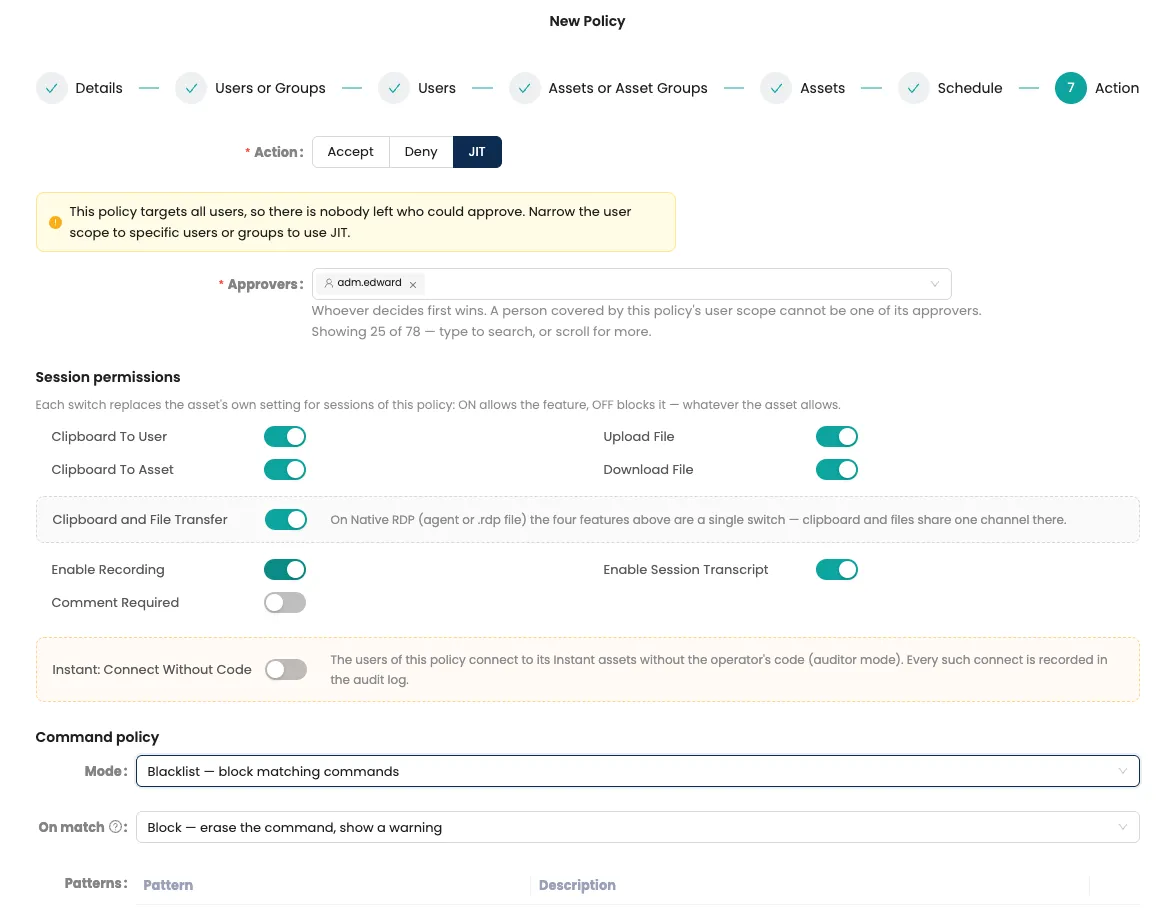
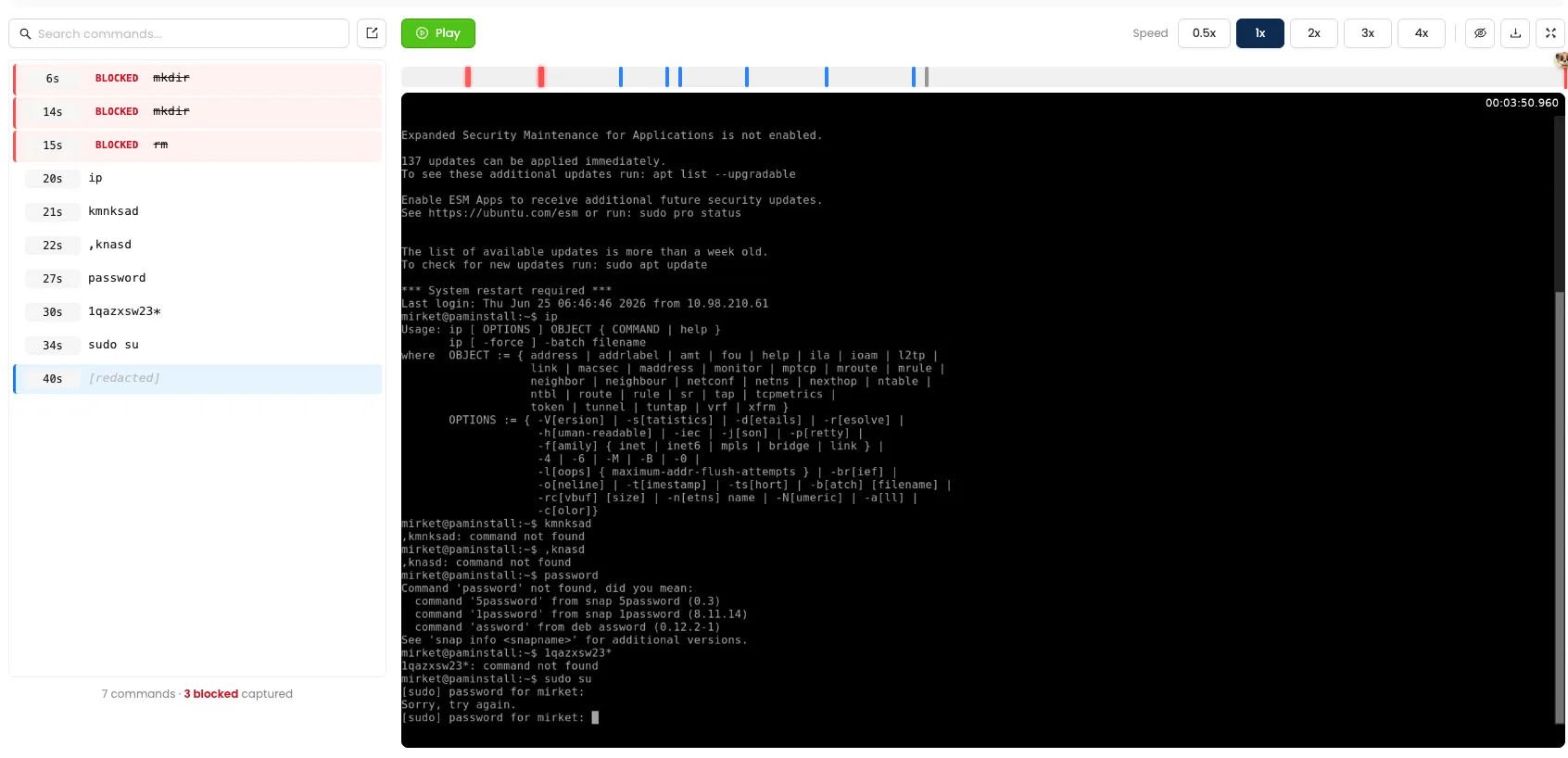
- Command policy runs in blacklist or whitelist mode. When a pattern matches, it can mark the command in the transcript, remove it before it runs, or end the session outright.
- Privilege escalation can be challenged at the moment it happens. An escalation inside an RDP or SSH session can require multi-factor re-verification, or an administrator’s approval, before it proceeds.
- Just-in-time access leaves a record of intent. Each request carries a reason and a named approver, so access that appears without one stands out by itself.
- Transcripts are text. Finding out whether a command was ever run is a search, not an afternoon of watching video.
Capabilities
Access and coverage
| Native RDP | The administrator connects with Microsoft Remote Desktop and their own settings, from a .rdp file Mirket generates. Clipboard rules, file-transfer rules and command policy are enforced inside that session. |
| Native SSH and SFTP | Started from a launcher Mirket generates, in the SSH client already installed on the administrator’s machine. SFTP runs under the same authorisation and audit, and closes when the session does. |
| Single-use launchers | A generated connection file has to be run within a minute and works once, so it can’t be kept, forwarded or found later. |
| The Mirket agent | Carries its own RDP and SSH tooling and keeps the session within the agent window, where it also does not appear in a screen capture taken on that machine. ZTNA covers that containment in full. |
| Mirket’s isolated browser | The same RDP and SSH sessions over HTML5, with nothing installed — for people who don’t have a client, don’t want one, or don’t work for you. It’s Mirket’s browser, running remotely, not one on their machine. |
| Web applications | Firewall interfaces, hypervisors, backup consoles and internal web applications open inside Mirket’s own isolated browser, not the user’s. Mirket fills in the credential; the user never sees it and can’t extract it from their own browser. |
| Desktop applications | Published through terminal server or RemoteApp and treated like any other target. |
Credentials
| Password vault | Privileged account passwords are held and issued by Mirket. The user selects a target; the credential is injected. |
| Automatic rotation | Per account, on a schedule — interval in days and time of day. |
| Account mapping | Defined per asset and per asset group; group-level mappings apply to every asset in the group. |
| Controlled disclosure | Where a password genuinely has to be visible to a human, who may see it is set explicitly — by user, by group, or by external source. |
| SSH key management | Key pairs used for privileged access are held and rotated centrally, so the private key isn’t sitting in a laptop’s .ssh directory with no expiry on it. |
| Secrets vault | Encrypted storage, lifecycle management and API key management for application secrets. |
| Credential provider | Applications request the secret they need at run time instead of carrying it — the credential comes out of the configuration file and the source repository. |
| Glass Break — emergency access | Controlled emergency access for the case where the PAM service itself is unavailable. Mirket produces an encrypted recovery package holding the account, asset and mapping information needed to reach systems directly, protected by a single-use recovery password and reissued whenever the configuration changes. |
Policy and session hardening
| Session policy | Matches on users or groups, targets or target groups, and schedule. Action is accept, deny, or just-in-time approval. |
| Command policy | Off, blacklist or whitelist. On a match: audit only, block the command, or kill the session. Applies wherever a session has a command line, not only on RDP and SSH — the CLI console built into an appliance’s web interface, and the query window of a database client published as a RemoteApp, are filtered by the same rules. |
| Clipboard control | Each direction authorised separately — into the session and out of it. |
| File transfer control | Upload and download authorised separately, with drag-and-drop where it’s allowed. |
| MFA on privilege escalation | Escalation inside a session can require re-verification or an approval, rather than being a step nobody sees. |
| Just-in-time access | Standing access is replaced by a request with a stated reason, a named approver and a start-and-end window. The first approver to decide settles it, nobody can approve their own request, and a granted window can be revoked before it expires. |
Visibility and audit
| Session recording | Video of the whole session, on the native path as well as the browser path. Idle stretches are removed on playback and speed is adjustable. |
| Command transcript | The session as text, readable without generating the video. Searchable, filterable, exportable as CSV, with flagged and blocked commands already marked. |
| Search straight to the moment | Search for a command and the player moves to where it was typed. |
| Live session view | Active sessions show who is connected, to what, and for how long. An administrator can join at a chosen authority level, or terminate the session. |
| Session history | Every closed session, including who joined it, at what authority, and for how long. |
| Reports | User-based and asset-based, over a time range you choose, generated on a schedule and emailed to named recipients. |
Inventory and access review
| Asset discovery | Domain-joined servers imported as assets, with OS, OU, ping and WinRM reachability — filterable before you import anything. |
| Account discovery | Local accounts on those servers, with last logon and group membership. The local administrator account nobody remembers creating shows up here. |
| Scheduled rediscovery | Daily, weekly, monthly, every N hours or minutes, or a cron expression. |
| Access matrix | One view of which users can reach which systems, and with which accounts — read from what is currently in place rather than from what was documented. |
See a privileged session on your own servers
Administrators working in a native RDP and SSH session, a credential they never see, a session recorded as video and searchable text, and the command policy that applies inside it.

The questions it has to answer afterwards
Control is half of a privileged access programme. The other half turns up months later, when somebody asks about something that already happened — and the answer has to come from the system rather than from what people remember.
Reports run in both directions. Ask what one user reached, or ask who reached one asset, over the time range you choose. Privileged sessions carry a start, an end and a duration, so the answer covers how long as well as whether.
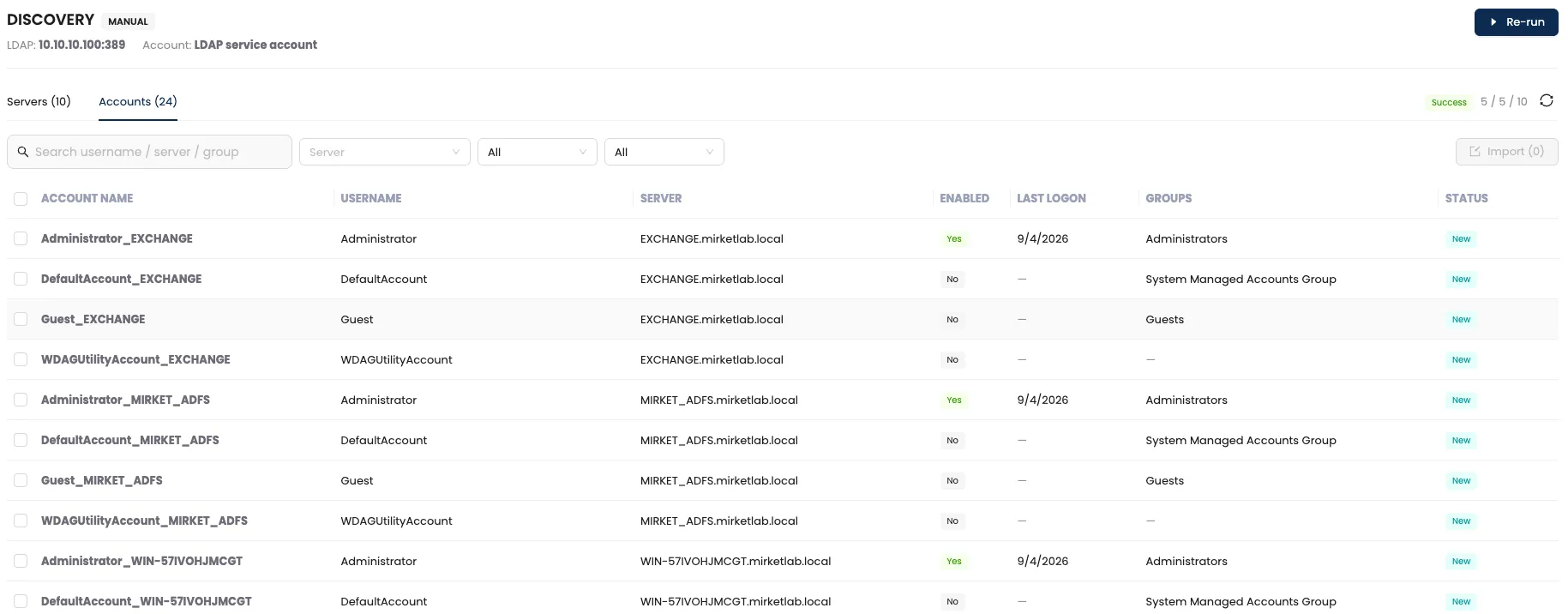
They arrive without anyone logging in to produce them. A report definition takes a time range, a frequency, a day and a time, and a list of email recipients — so the review no longer depends on somebody remembering to run it the week before the audit.
The accounts nobody is using can be listed too. An account that is enabled and privileged but hasn’t authenticated in a very long time is worth knowing about, and it stays invisible until something reports on it.

Who can reach what, as things currently stand
The access matrix is one view of which users can reach which systems, and with which accounts.
Not what was documented, and not what was true at the last review. That is the artefact an access review was always trying to assemble by hand, one system owner at a time — and it is the same view a regulator’s question tends to start from. Privileged Account Discovery covers how the inventory underneath it is built and kept current.
Two things to test in a proof of concept
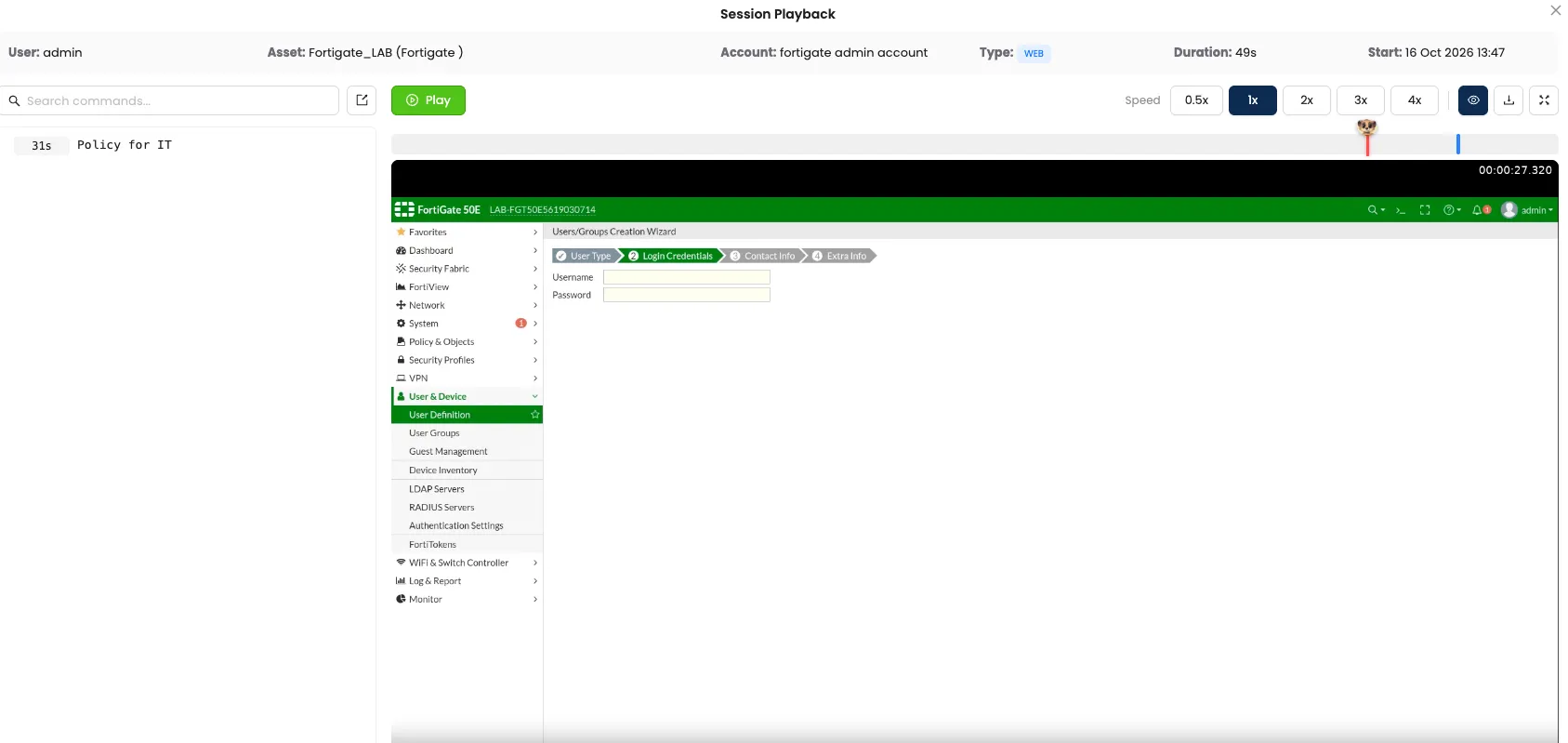
Ask for three recordings, not one
Any PAM product can record a session that runs inside its own browser. That session is already running on the vendor’s side, so capturing it costs them almost nothing.
Ask for three instead: a native RDP session, a native SSH session, and a web console — the firewall, the hypervisor or the backup system. That third one is where coverage usually stops.
Mirket records all three. The administrator opens a generated .rdp in Microsoft Remote Desktop, works in the SSH tooling built into the Mirket agent, or reaches a web console through the isolated browser. The credential is injected on every path, clipboard and file-transfer rules apply on every path, and each session produces the same video and searchable transcript.
A recording nobody can search isn’t evidence
An eight-hour RDP recording is not an audit trail. It’s an eight-hour video.
When an auditor asks what happened at 14:40, or an incident team needs to know whether one particular command was ever run, the difference between a control and a shelf of media is whether anyone can find the answer.
Mirket produces the text alongside the video. Search for a command and the player jumps to the moment it was typed. Blocked and flagged commands are already marked, so the interesting parts don’t have to be discovered. The transcript can be read without generating the video at all, and exported when the evidence has to leave the platform.
Audit and compliance
Mirket doesn’t make you compliant — no product does. These are the requirements privileged access usually gets measured against, and what the platform gives you to answer them with.
PCI DSS v4.x
Req. 7 and 8Access limited to what each role needs, and privileged accounts attributable to an individual rather than shared. The access matrix shows the current state of both without assembling it by hand.
PCI DSS v4.x
Req. 10Actions taken by anyone with administrative access are logged. Session video and command transcript record the action, not merely the connection.
ISO/IEC 27001:2022
A.8.2, A.8.15, A.8.18Privileged access rights, logging, and use of privileged utility programs.
NIS2
Art. 21Access control, multi-factor authentication and asset management for essential and important entities.
Deployment
On-premise, on Linux with no separate Windows jump servers to build and maintain.
PAM runs with no additional operating system licence. Nothing is installed on the systems being reached either — no agent on the servers, no agent on the applications.
If Mirket Portal is already running for MFA, SSO or self-service, PAM is a module on it. Not a second server, not a second console.
On the user’s side there’s a choice and nothing more: Mirket’s isolated browser, a single-use launcher from the portal, or the Mirket agent — and only the last of the three installs anything at all.
High availability is an active-passive pair. The standby node is synchronised continuously from the active one and promotes itself if the active stops answering — so running on Linux rather than a row of Windows jump servers doesn’t mean running on one box.
You pick one. User based is predictable for stable teams; concurrent counts active sessions at once and is cheaper where many hold privilege but few connect simultaneously.
No per-asset licensing: you pay for people, not managed servers. Internal access needs no ZTNA licence (the Mirket Native Client is included with PAM).